“Group alarm” can mean two things. It can be one alarm that rings on everyone's phone at once, or a few friends who each get up at their own time and can see who's up. Here's how to do either. We make Dawnmates, which does the second.
Two kinds of group alarm
One alarm that rings for everyone
It's what you want for a trip, an early flight or a shared shift: one time, and every phone rings. Some apps do this. Galarm has group alarms that ring for everyone in the group, and each person can accept or decline. There's more in alarm apps with friends, compared.
Each person up at their own time
This one is for building a habit rather than getting through a single morning. Everyone sets their own time on their own phone, and the group sees who's up. Nobody rings anybody. What gets you out of bed is knowing your friends will see you check in. Dawnmates works this way.
With the phone you already have
You can try this without a new app. Everyone sets an alarm in the iPhone's Clock app, and you start a group chat for mornings. Whoever is up first sends a message, and the others reply when they are.
It works, and it's free. The trouble is that it's easy to forget the message, you can't see at a glance who's still asleep, and a busy chat buries the morning ones. A calendar reminder won't stand in for an alarm either, because it follows your silent switch.
How to start a morning crew
- Pick your crewTwo to four friends who want to get up around the same time. Smaller groups tend to last longer.
- Each choose a wake timeEveryone picks their own time and days. Nobody has to match anyone else.
- Agree what counts as upOut of bed, not just awake. A check-in should mean you're up for the day.
- Check in each morningA tap in an app, or a message in the group chat, as soon as you're up.
- Allow days offWeekends, sick days and late nights happen. Groups that allow days off last longer.
How Dawnmates does it
A crew is you and up to three friends, free. Everyone sets their own wake time. Your alarm rings on your own phone at your time, with its sound even on silent, and a few backup reminders follow in case you drift off again. When you're up, you check in and your face rises on a shared horizon that your crew can see.
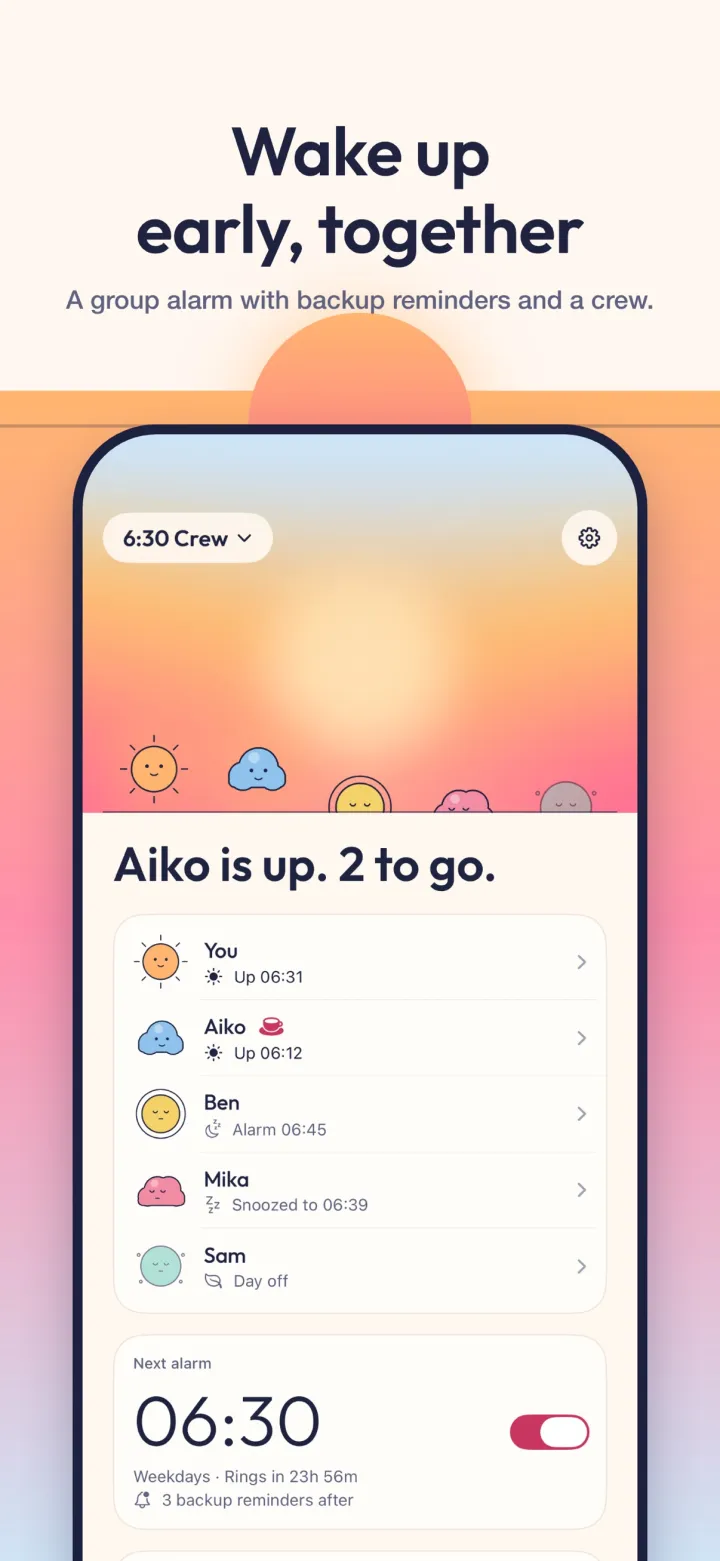
If someone hasn't checked in, the crew can send them one friendly nudge a day. A day off shows as a day off. There's no ranking and no red cross.
What it can't do
Dawnmates can't ring a friend's phone, and it can't promise to wake anyone. Some things are out of an app's hands, like a flat battery. It isn't a treatment for sleep problems either, so if you're tired all the time, see a doctor. It needs an iPhone with iOS 26 or later.
Questions
Can one person set an alarm for the whole group?
Some apps let you, like Galarm's group alarms, where everyone in the group has the app and accepts the alarm. In Dawnmates each person sets their own time, so nobody sets an alarm on someone else's phone.
Does the Dawnmates alarm ring on silent?
Yes, at full volume. The backup reminders that follow go by your silent switch and Focus, so check both the night before.
How many people can be in a group?
A free crew is up to four, you included. Plus or a one-time Crew Pass lets a crew grow to eight. Friends join free and never have to sign in or pay.
Does it work on Android?
The app is for iPhone with iOS 26 or later, and Apple Watch. A friend on another phone can join your crew from the invite link on the web and tap I'm up there.
Try it with a few friends
Dawnmates is free for one crew of up to four people. Your alarm is always free and never locked behind Plus, and there are no ads. It needs iOS 26 or later.
Download on the App StoreFacts checked on 3 November 2026.